Best Wireless Gaming Mice in Canada
An independent Canadian buying guide to wireless gaming mice — quick picks, a comparison table, 2.4GHz vs Bluetooth, wireless vs wired, weight, grip, battery life, DPI, polling rate, how much to spend, mistakes to avoid, and an FAQ.
Affiliate disclosure: Borealis is reader-supported. We may earn a commission from qualifying purchases made through certain links — at no extra cost to you. We do not currently use Best Buy affiliate links, and we are not affiliated with Best Buy or any retailer. Read the full disclosure.
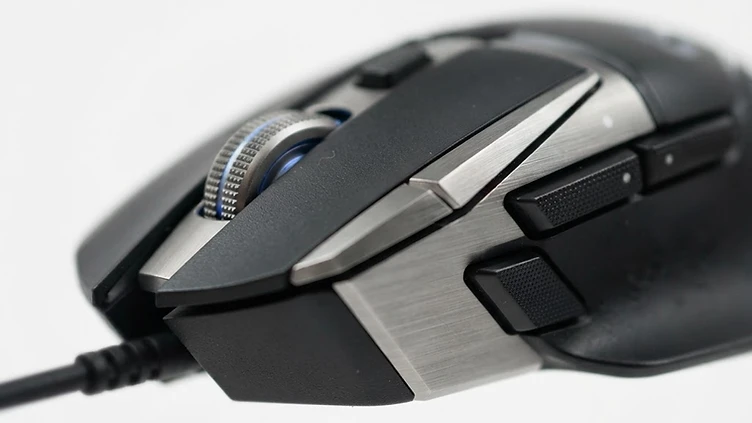
Wireless gaming mice are no longer a compromise. A modern 2.4GHz gaming mouse uses a dedicated receiver built around responsive input, and rechargeable models hold their charge for weeks of typical play. What separates the mice in this guide is weight, shape, connectivity, battery setup, and buttons — not whether a cable is attached.
This guide compares eight wireless mice sold in Canada, from a ~$40 pick that runs on a single AA battery to a ~$220 pro-grade mouse for competitive play. Each section says who the mouse actually suits, so you can match one to your hand, your games, and your budget.
A note on accuracy. Prices are approximate, current as of October 2026, taken from Canadian retailer listings, and can change — several are sale prices. We haven't personally tested these mice; our picks are based on verified manufacturer and retailer specifications. Battery figures are manufacturer-stated.
Quick Picks
- Best budget wireless gaming mouse — Logitech G305 LIGHTSPEED (~$40, sale): A 99 g body, a 12,000 DPI HERO sensor, and 2.4GHz LIGHTSPEED, all on one AA battery. The cheapest route here to genuine gaming-grade wireless.
- Best budget ergonomic wireless mouse — Razer DeathAdder V2 X HyperSpeed (~$50, sale): A right-handed ergonomic shape with 2.4GHz, Bluetooth, and seven programmable buttons. For shoppers who want a full-size shape plus laptop-friendly wireless.
- Best budget wireless mouse with extra buttons — Razer Basilisk V3 X HyperSpeed (~$60, sale): Nine customizable controls, a multi-function trigger, dual wireless, and RGB for around $60. For MMO, MOBA, and productivity players who want shortcuts under $100.
- Best value lightweight wireless mouse — Razer Viper V3 HyperSpeed (~$69, sale): An ~82 g ambidextrous body, a 30,000 DPI Focus Pro sensor, and up to 280 hours on one AA — but 2.4GHz only.
- Best lightweight ergonomic wireless mouse — Razer DeathAdder V3 HyperSpeed (~$97, sale): An ~55 g ergonomic mouse with a 26,000 DPI sensor, USB-C charging, and up to 100 hours per charge. The lightest rechargeable option here.
- Best feature-rich wireless mouse — Logitech G502 LIGHTSPEED (~$120, sale): Eleven programmable buttons, a free-spin scroll wheel, 25,600 DPI, RGB, and six adjustable weights.
- Best premium ergonomic wireless mouse — Razer Basilisk V3 Pro (~$130, sale): A 30,000 DPI sensor, 10+1 buttons, Bluetooth, 13-zone RGB, and optional wireless charging in Razer's Basilisk shape.
- Best premium wireless mouse for competitive FPS — Logitech G PRO X Superlight 2 (~$220): An ~60 g shell, a 44,000 DPI HERO 2 sensor, hybrid optical-mechanical switches, and up to 95 hours per charge.
There's no single best wireless gaming mouse — the right one depends on your grip, your hand size, your games, and your budget.
Quick Comparison Table
All eight use a 2.4GHz gaming connection, and three also support Bluetooth. Prices are approximate, current as of October 2026, and several are sale prices.
| Mouse | Approx. Canadian price | Connection | Weight | Sensor / max DPI | Battery | Best for |
|---|---|---|---|---|---|---|
| Logitech G305 LIGHTSPEED | ~$40 (sale) | 2.4GHz LIGHTSPEED (USB dongle) | ~99 g | HERO / 12,000 DPI | 1× AA, up to 250 hrs | Best budget wireless gaming mouse |
| Razer DeathAdder V2 X HyperSpeed | ~$50 (sale) | 2.4GHz HyperSpeed + Bluetooth | ~100 g | 5G Advanced 14K / 14,000 DPI | 1× AA, up to 235 hrs (2.4GHz) / 615 hrs (Bluetooth) | Best budget ergonomic wireless mouse |
| Razer Basilisk V3 X HyperSpeed | ~$60 (sale) | 2.4GHz HyperSpeed + Bluetooth | ~106 g | 5G Advanced 18K / 18,000 DPI | 1× AA, up to 285 hrs (2.4GHz) / 535 hrs (Bluetooth) | Best budget wireless mouse with extra buttons |
| Razer Viper V3 HyperSpeed | ~$69 (sale) | 2.4GHz HyperSpeed (USB dongle) | ~82 g | Focus Pro 30K / 30,000 DPI | 1× AA, up to 280 hrs | Best value lightweight wireless mouse |
| Razer DeathAdder V3 HyperSpeed | ~$97 (sale) | 2.4GHz HyperSpeed (USB dongle) or wired USB-C | ~55 g | Focus X / 26,000 DPI | Rechargeable, up to 100 hrs (manufacturer-stated) | Best lightweight ergonomic wireless mouse |
| Logitech G502 LIGHTSPEED | ~$120 (sale) | 2.4GHz LIGHTSPEED (USB receiver) | ~120 g | HERO 25K / 25,600 DPI | Rechargeable, up to 60 hrs | Best feature-rich wireless mouse |
| Razer Basilisk V3 Pro | ~$130 (sale) | 2.4GHz HyperSpeed + Bluetooth | ~126 g | Focus Pro 30K / 30,000 DPI | Rechargeable; optional wireless charging dock | Best premium ergonomic wireless mouse |
| Logitech G PRO X Superlight 2 | ~$220 | 2.4GHz LIGHTSPEED (USB receiver) | ~60 g | HERO 2 / 44,000 DPI | Rechargeable, up to 95 hrs | Best premium wireless mouse for competitive FPS |
Battery figures need a caveat: the AA-powered mice are rated differently over 2.4GHz than over Bluetooth, and the rechargeable figures assume typical use at default polling rates and lighting settings. Treat these as a rough comparison, not a like-for-like one.
Affiliate links aren't active yet. We'll add them once our program is approved. For now, search the product name at your preferred Canadian retailer to check the current price and availability.
Pros and Cons at a Glance
Prices are approximate, in CAD, and can change. The points below are based on documented specifications and manufacturer-stated figures, not hands-on testing.
Logitech G305 LIGHTSPEED (~$40, sale) — Best Budget Wireless Gaming Mouse
- Pros: the cheapest dependable 2.4GHz gaming mouse here; HERO sensor rated to 12,000 DPI; up to 250 hours on one AA battery; symmetrical shell.
- Cons: around 99 g — heavy next to modern lightweight mice; AA battery rather than rechargeable; no Bluetooth.
Razer DeathAdder V2 X HyperSpeed (~$50, sale) — Best Budget Ergonomic Wireless Mouse
- Pros: ergonomic right-handed shape; 2.4GHz HyperSpeed plus Bluetooth; up to 235 hours on one AA over 2.4GHz; 14,000 DPI sensor.
- Cons: around 100 g, so it's a heavier mouse; AA battery adds weight and needs replacing; no rechargeable option.
Razer Basilisk V3 X HyperSpeed (~$60, sale) — Best Budget Wireless Mouse With Extra Buttons
- Pros: extra buttons plus a thumb rest; 18,000 DPI sensor; 2.4GHz plus Bluetooth; up to 285 hours on one AA.
- Cons: around 106 g — heavy for fast-paced FPS play; AA battery rather than rechargeable; right-handed shape only.
Razer Viper V3 HyperSpeed (~$69, sale) — Best Value Lightweight Wireless Mouse
- Pros: around 82 g with a symmetrical shape; 30,000 DPI Focus Pro sensor; up to 280 hours on one AA.
- Cons: runs on an AA battery rather than charging; no Bluetooth; the symmetrical shell has no thumb-rest buttons.
Razer DeathAdder V3 HyperSpeed (~$97, sale) — Best Lightweight Ergonomic Wireless Mouse
- Pros: around 55 g — the lightest ergonomic mouse here; 26,000 DPI sensor; rechargeable with a manufacturer-stated 100 hours; works over 2.4GHz or wired USB-C.
- Cons: few buttons compared with the feature-focused picks; no Bluetooth; priced close to $100.
Logitech G502 LIGHTSPEED (~$120, sale) — Best Feature-Rich Wireless Mouse
- Pros: 11 programmable buttons plus adjustable weights; HERO 25K sensor; dual-mode scroll wheel; rechargeable with a manufacturer-stated 60 hours.
- Cons: around 120 g before weights — very heavy for competitive play; no Bluetooth; the shortest battery figure among the rechargeable picks here.
Razer Basilisk V3 Pro (~$130, sale) — Best Premium Ergonomic Wireless Mouse
- Pros: 30,000 DPI Focus Pro sensor; 2.4GHz plus Bluetooth; thumb rest with plenty of buttons; supports an optional wireless charging dock.
- Cons: around 126 g — the heaviest rechargeable mouse here; premium price; right-handed shape only.
Logitech G PRO X Superlight 2 (~$220) — Best Premium Wireless Mouse for Competitive FPS
- Pros: around 60 g with a symmetrical shell; HERO 2 sensor rated to 44,000 DPI; rechargeable with a manufacturer-stated 95 hours; built for fast, low-sensitivity aiming.
- Cons: the most expensive mouse here; no Bluetooth; deliberately minimal buttons.
Check current price. No retailer links appear here yet — no affiliate program is active. Once one is approved, each pick above will carry a "Check current price" link to a Canadian retailer. For now, search the exact model name to confirm today's price, since several of these are sale prices.
Logitech G305 LIGHTSPEED — Best budget wireless gaming mouse (~$40, sale)
Why consider it. The least expensive mouse here with a gaming-oriented wireless connection, running on a single AA battery you can swap in seconds. Key specifications. 2.4GHz LIGHTSPEED via USB nano receiver (no Bluetooth) · ~99 g · HERO sensor, 12,000 DPI maximum · 6 programmable buttons · one AA battery, up to 250 hours · ambidextrous, no RGB. Best for. Casual players who want a dependable wireless mouse for the least money. Potential drawbacks. Heavy at ~99 g; no Bluetooth or RGB; the lowest DPI ceiling here. Who should buy it. Buy it if you want wireless gaming on a tight budget and don't mind the weight.
Razer DeathAdder V2 X HyperSpeed — Best budget ergonomic wireless mouse (~$50, sale)
Why consider it. It pairs a right-handed ergonomic shape with 2.4GHz and Bluetooth on one AA battery — dual connectivity at a price where most mice only give you a dongle. Key specifications. 2.4GHz HyperSpeed and Bluetooth · ~100 g · Razer 5G Advanced 14K sensor, 14,000 DPI maximum · 7 programmable buttons · one AA battery: up to 235 hours on 2.4GHz, 615 hours on Bluetooth · no RGB. Best for. Palm-grip players who want a full-size shape, plus Bluetooth for a laptop or second device. Potential drawbacks. Heavy at ~100 g; a lower sensor spec than the newer Razer models here; battery life varies sharply by connection mode. Who should buy it. Buy it if you want an affordable ergonomic wireless mouse and value Bluetooth as much as gaming wireless.
Razer Basilisk V3 X HyperSpeed — Best budget wireless mouse with extra buttons (~$60, sale)
Why consider it. The cheapest route here to a large control set: nine customizable controls including a multi-function trigger, plus dual wireless and RGB. Key specifications. 2.4GHz HyperSpeed and Bluetooth · ~106 g · Razer 5G Advanced 18K sensor, 18,000 DPI maximum · 9 customizable controls (listed as 7 programmable buttons) · one AA battery: up to 285 hours on 2.4GHz, 535 hours on Bluetooth · Chroma RGB · right-handed with a thumb rest. Best for. MMO, MOBA, and productivity players who want plenty of buttons without crossing $100. Potential drawbacks. One of the heaviest mice here at ~106 g; AA batteries rather than a rechargeable cell; RGB is cosmetic. Who should buy it. Buy it if you want an ergonomic wireless mouse with plenty of controls on a budget.
Razer Viper V3 HyperSpeed — Best value lightweight wireless mouse (~$69, sale)
Why consider it. An ~82 g ambidextrous body with a 30,000 DPI Focus Pro sensor for well under $100, still running on a single AA battery. Key specifications. 2.4GHz HyperSpeed via USB dongle (no Bluetooth) · ~82 g · Razer Focus Pro 30K sensor, 30,000 DPI maximum · 6 programmable buttons · one AA battery, up to 280 hours · no RGB. Best for. Competitive players who want a light, symmetrical mouse for quick movement. Potential drawbacks. No Bluetooth, so it's a desk mouse rather than a travel one; the symmetrical shape has no thumb rest. Who should buy it. Buy it if you want low weight and a high-end sensor at a mid-range price.
Razer DeathAdder V3 HyperSpeed — Best lightweight ergonomic wireless mouse (~$97, sale)
Why consider it. At ~55 g it's the lightest rechargeable mouse here, paired with an ergonomic right-handed shape and USB-C charging. Key specifications. 2.4GHz HyperSpeed via USB dongle, or wired over USB-C · ~55 g · Razer Focus X sensor, 26,000 DPI maximum · Gen-3 optical switches · rechargeable battery, manufacturer-rated up to 100 hours · USB-C charging · no RGB · higher polling rates need Razer's HyperPolling dongle (sold separately). Best for. Competitive players who want a light mouse with an ergonomic shape rather than a symmetrical one. Potential drawbacks. Costs noticeably more than the Viper V3 HyperSpeed; no Bluetooth; the 8,000Hz HyperPolling dongle isn't included. Who should buy it. Buy it if you want a light, ergonomic, rechargeable mouse and will pay for the weight saving.
Logitech G502 LIGHTSPEED — Best feature-rich wireless mouse (~$120, sale)
Why consider it. The most customization in this guide: 11 programmable buttons, a wheel that switches between notched and free-spin, RGB, and six adjustable weights. Key specifications. 2.4GHz LIGHTSPEED via USB receiver, or wired over USB · ~120 g · HERO 25K sensor, 25,600 DPI maximum · 11 programmable buttons · rechargeable battery, up to 60 hours · 16.8 million-colour RGB · six adjustable weights · right-handed. Best for. MMO and MOBA players, and productivity users, who want lots of buttons and macros. Potential drawbacks. The second-heaviest mouse here at ~120 g; no Bluetooth; the large shape won't suit small hands or a fingertip grip. Who should buy it. Buy it if controls and customization matter to you more than low weight.
Razer Basilisk V3 Pro — Best premium ergonomic wireless mouse (~$130, sale)
Why consider it. The fully loaded Basilisk: a 30,000 DPI sensor, 10+1 programmable buttons, dual wireless, a tilt wheel that cycles and free-spins, the most RGB here, and wireless-charging support. Key specifications. 2.4GHz HyperSpeed and Bluetooth · ~126 g · Razer Focus Pro 30K sensor, 30,000 DPI maximum · 10+1 programmable buttons · 5 onboard profiles · rechargeable battery · HyperScroll tilt wheel · 13-zone Chroma RGB · charges wirelessly with Razer's Mouse Dock Pro or charging puck (sold separately). Best for. Shoppers who want one mouse to cover everything — many buttons, Bluetooth, RGB, and a top-tier sensor. Potential drawbacks. The heaviest mouse here at ~126 g; wireless charging needs accessories that aren't included. Who should buy it. Buy it if you want a feature-complete ergonomic wireless mouse and don't mind the weight.
Logitech G PRO X Superlight 2 — Best premium wireless mouse for competitive FPS (~$220)
Why consider it. At ~60 g it's one of the lightest mice here, built around a minimal five-button shape and a 44,000 DPI HERO 2 sensor, with the longest rechargeable battery life in this guide. Key specifications. 2.4GHz LIGHTSPEED via USB receiver, or wired over USB-C · ~60 g · HERO 2 sensor, 44,000 DPI maximum · LIGHTFORCE hybrid optical-mechanical switches · rechargeable battery, up to 95 hours · USB-C charging · 8,000Hz polling per manufacturer specifications · no RGB. Best for. Competitive FPS players who want a light, no-frills mouse with a clean symmetrical shape. Potential drawbacks. The most expensive mouse here by a wide margin; no Bluetooth or RGB; five buttons won't suit players who want many keybinds. The earlier G PRO X Superlight still appears in some Canadian listings for a little less. Who should buy it. Buy it if low weight and a top-tier sensor matter more than extras.
Are Wireless Gaming Mice Good for Gaming?
Yes — for most players, a gaming-focused wireless mouse is a sensible choice rather than a compromise. These mice use a dedicated 2.4GHz connection (the small USB receiver in the box) designed around responsive input, and the battery and weight penalties that once came with wireless have largely shrunk.
Keep the two modes separate:
- 2.4GHz wireless — a dedicated receiver, designed for low-latency input, and usually the mode manufacturers rate for gaming.
- Bluetooth — convenient for laptops and travel and often more power-efficient, but not usually the mode these mice are engineered around for play.
Don't assume every wireless mouse performs identically: connection quality depends on the model, the receiver, where you plug it in, and what's nearby. In practice, a 2.4GHz gaming mouse from a known brand is a well-established option for competitive play.
2.4GHz Wireless vs Bluetooth
2.4GHz wireless (with a USB receiver)
- A small dongle, usually stored inside the mouse for travel.
- The connection gaming mice are designed around: low latency, consistent polling.
- Receiver placement matters — use the included extension cable or a front-panel USB port if the mouse sits far from the PC, away from crowded hubs and metal cases.
Bluetooth
- No receiver needed, so it's convenient for laptops and for swapping between two or three devices.
- Often more battery-efficient, which suits portable use.
- Not the gaming-focused mode: high polling rates, onboard profiles, and lighting control can behave differently, or be unavailable, over Bluetooth.
Use 2.4GHz at your desk and keep Bluetooth for laptop work and travel. Performance varies by model, so check the manufacturer's specifications if you plan to game over Bluetooth.
Wireless vs Wired Gaming Mice
Wireless advantages: a cleaner desk with no cable to manage or snag; no cable drag during fast movement; portability, since Bluetooth models pair to a laptop without a dongle.
Wireless disadvantages: higher prices on some models; batteries to charge or replace; most gaming models use a receiver that occupies a USB port.
Wired advantages: usually cheaper for equivalent specs; no battery to manage; plug in and play with no pairing.
Wired disadvantages: the cable can drag or catch on a desk edge; less freedom of movement and more clutter.
Neither is automatically faster. A wired mouse has no battery or receiver to manage, while a well-implemented 2.4GHz gaming connection is engineered for low-latency input — whether you notice a difference comes down to the model and your setup.
How Much Does Mouse Weight Matter?
Weight changes how a mouse feels to move, and preference is personal. Lighter is not automatically better.
- Under 60 g — ultralight; easy to flick and stop quickly, which suits low-sensitivity play. Here: DeathAdder V3 HyperSpeed (~55 g).
- 60–80 g — light but not extreme; a broad middle ground. Here: G PRO X Superlight 2 (~60 g).
- 80–100 g — planted, yet still quick to move. Here: Viper V3 HyperSpeed (~82 g) and G305 (~99 g).
- 100 g and up — the heaviest group, usually carrying more buttons, RGB, and bigger batteries. Here: DeathAdder V2 X HyperSpeed (~100 g), Basilisk V3 X HyperSpeed (~106 g), G502 LIGHTSPEED (~120 g), Basilisk V3 Pro (~126 g).
These are broad categories, not quality ratings. The right weight is the one you can control comfortably for a whole session — and a mouse with more features will almost always weigh more.
Which Mouse Grip Do You Use?
- Palm grip — your whole hand rests on the mouse; favours longer, fuller shapes with a taller back, like the DeathAdder V2 X HyperSpeed or the Basilisk models.
- Claw grip — your palm heel and fingertips touch, with an arched hand; works with medium shapes and a defined hump, like the Viper V3 HyperSpeed or G305.
- Fingertip grip — only your fingertips contact the mouse; suits shorter, lighter shapes, like the DeathAdder V3 HyperSpeed or G PRO X Superlight 2.
Shape and hand size often matter more than weight. Measure your hand — length from the base of your palm to your middle fingertip, and width across the knuckles — and compare it with the manufacturer's dimensions. Then look at mouse height, where the hump sits, whether there's a thumb rest, and whether the shape is right-handed or symmetrical. Handle a mouse in store if you can; it tells you more than any spec sheet. No grip is universally better — the right one is the one you already use.
What Type of Gamer Are You?
- Competitive FPS — weight, shape, and sensor consistency lead; polling rate matters only if your setup can use it. Here: G PRO X Superlight 2, DeathAdder V3 HyperSpeed, Viper V3 HyperSpeed.
- MMO/MOBA — programmable buttons first, then comfort over long sessions. Here: Basilisk V3 Pro, Basilisk V3 X HyperSpeed, G502 LIGHTSPEED.
- General gaming — balance comfort, battery life, and price; choose by grip and budget, not the spec sheet. Here: G305, DeathAdder V2 X HyperSpeed.
- Gaming plus school or work — Bluetooth and multi-device support matter more than peak specs, and battery life decides how often you reach for a cable. Here: DeathAdder V2 X HyperSpeed, Basilisk V3 X HyperSpeed, Basilisk V3 Pro.
How Much Battery Life Do You Need?
There are two battery approaches here, and the trade-off matters more than the headline hours.
- Replaceable AA batteries (G305, DeathAdder V2 X HyperSpeed, Basilisk V3 X HyperSpeed, Viper V3 HyperSpeed): you never plug the mouse in — when it runs low, you swap in a fresh battery. Ratings run into the hundreds of hours, and Bluetooth stretches them further. You pay in a little extra weight and buying batteries.
- Rechargeable internal batteries (DeathAdder V3 HyperSpeed, G502 LIGHTSPEED, Basilisk V3 Pro, G PRO X Superlight 2): you charge over USB-C, or wirelessly on a dock with the right accessories. Ratings run from about 60 to 100 hours — shorter, but you're never buying batteries, and the cell ages over time.
Don't compare manufacturer hours as though they were measured the same way. Figures are usually quoted at default settings, and real battery life depends on your connection, polling rate, RGB lighting, and how much you play. A mouse rated at 100 hours might last a fortnight of evenings or one long weekend of heavy play.
How Much DPI Do You Actually Need?
DPI (dots per inch) sets how far the cursor moves for each inch you move the mouse. It's sensitivity, not quality.
A higher maximum DPI does not make a mouse better. Every mouse here exceeds what almost any player uses; most people settle somewhere between 400 and 1,600 DPI and adjust in-game sensitivity to taste. Sensor consistency, shape, weight, button layout, and how the mouse feels in your hand matter far more. Treat a 44,000 DPI figure as a ceiling, not a score.
What Is Mouse Polling Rate?
Polling rate is how often the mouse reports its position to your PC, measured in hertz.
- 125Hz — about every 8 ms; fine for office work, less smooth in fast games.
- 500Hz — about every 2 ms; a clear step up.
- 1000Hz — about every 1 ms; the gaming standard, and plenty for most players.
- 2000Hz and 4000Hz — more frequent reporting; smoother to some players, with higher CPU and battery cost.
- 8000Hz — roughly every 0.125 ms; aimed at competitive players with hardware that can keep up.
Higher rates can mean smoother tracking, but they also raise system workload and battery drain, and many games and monitors can't take full advantage. If you're unsure, 1,000Hz is a sensible default — and two mice here can't reach 8,000Hz without an add-on dongle.
Wireless Gaming Mouse Prices in Canada
- Under $60 — a capable wireless mouse: a reliable 2.4GHz connection, a gaming-grade sensor, and either AA batteries or basic Bluetooth, usually in a heavier body. Here: G305 (~$40), DeathAdder V2 X HyperSpeed (~$50), Basilisk V3 X HyperSpeed (~$60). For more budget options, see our Best Gaming Mice Under $50 in Canada guide.
- $60–$100 — the value range: lighter bodies, higher-end sensors, and rechargeable batteries instead of AA. Here: Viper V3 HyperSpeed (~$69) and DeathAdder V3 HyperSpeed (~$97). Our Best Gaming Mice Under $100 in Canada guide covers more picks in this band.
- $100–$150 — premium features arrive: more buttons, onboard profiles, RGB, Bluetooth, adjustable weight, and wireless charging. Here: G502 LIGHTSPEED (~$120) and Basilisk V3 Pro (~$130).
- $150–$220 and up — you're paying for low weight and a top-tier sensor rather than extra features. Here: G PRO X Superlight 2 (~$220).
Spending more doesn't automatically mean a better fit, and sale pricing regularly moves models between these bands — always check the live listing.
5 Mistakes to Avoid When Buying a Wireless Gaming Mouse
- Choosing by DPI alone. A bigger number isn't better; most players use a fraction of the maximum.
- Ignoring shape. Shape decides comfort and control more than any spec. Handle the mouse if you can, or compare its dimensions and grip style.
- Ignoring hand size. Too small and your fingers cramp; too large and the buttons are a stretch. Compare your measurements with the manufacturer's.
- Paying for features you won't use. RGB, 8,000Hz polling, wireless charging, and eleven buttons are only worth it if you'll actually use them.
- Not checking the wireless connection and battery setup. Confirm whether the mouse uses a 2.4GHz receiver, Bluetooth, or both, and whether it takes AA batteries or charges — that affects your day-to-day more than the sensor does.
How to Choose a Wireless Gaming Mouse
- Use 2.4GHz for gaming, Bluetooth for everything else. Every mouse here is built around a 2.4GHz receiver for low latency; Bluetooth is a convenience for laptops and battery life, not for competitive play.
- Decide how you want to power it. AA-battery mice are cheaper and never need charging but are heavier; rechargeable mice cost more and need a cable now and then.
- Pick the weight that suits your aim. Around 55–68 g suits fast, low-sensitivity FPS aiming; 100 g and up feels more planted and usually carries more buttons.
- Match the shape to your grip. Ergonomic right-handed shells support palm grips; symmetrical shapes suit claw and fingertip grips and either hand.
- Count the buttons you need. Shooters need two side buttons at most; MMOs and MOBAs benefit from the extra-button models.
- Don't chase DPI or polling rate. 1,000Hz polling is the gaming standard, and most players use 400–1600 DPI.
If you're still deciding between wired and wireless, our Best Gaming Mice Under $50 in Canada and Best Gaming Mice Under $100 in Canada guides list wired options at the same prices.
Before You Buy
- Prices in this guide are approximate, in CAD, and several are sale prices that change often — verify the live listing.
- Availability changes: models get revised or replaced, and listings sell out.
- Confirm weight, sensor, connection options, and battery type on the manufacturer or retailer page.
- Check whether the mouse includes the receiver and cable you need, and whether it supports Bluetooth as well as 2.4GHz.
- Note that manufacturer battery figures are best-case estimates and vary with use.
FAQ
Are wireless gaming mice worth it?
For most players, yes. A 2.4GHz gaming mouse removes the cable without much of a trade-off, and decent options now start around $40 in Canada.
Is 2.4GHz better than Bluetooth for gaming?
For gaming at a desk, yes. 2.4GHz with the supplied receiver is the connection these mice are designed around. Bluetooth suits laptops, travel, and battery life instead.
Do wireless gaming mice have lag?
They can add a small amount compared with a wired connection, but gaming-focused 2.4GHz designs are built to keep it low, and many players won't notice. Bluetooth is where responsiveness varies most.
What is the best wireless gaming mouse for FPS?
There's no single best pick. The G PRO X Superlight 2 and DeathAdder V3 HyperSpeed are the fastest-feeling options here, and the Viper V3 HyperSpeed is the budget route to low weight. Grip and hand size still decide.
What is a good cheap wireless gaming mouse?
The Logitech G305 LIGHTSPEED (~$40) is the cheapest reliable option here. Add the DeathAdder V2 X HyperSpeed (~$50) or Basilisk V3 X HyperSpeed (~$60) if you want Bluetooth as well.
Is a lightweight mouse better for gaming?
Not universally. Lighter mice make fast, low-sensitivity movements easier, which many FPS players prefer; heavier mice feel more planted and usually carry more features. Weight is preference.
How long do wireless gaming mice last on one charge or battery?
The AA-powered mice here are rated roughly 235 to 285 hours over 2.4GHz, and much longer over Bluetooth; the rechargeables are rated about 60 to 100 hours. RGB, high polling rates, and heavy use shorten both.
Do wireless gaming mice need to be charged?
Only the rechargeable ones. Four mice here run on replaceable AA batteries and never need charging; the other four charge over USB-C, and one supports an optional wireless charging dock.
Is 1000Hz polling rate enough for gaming?
Yes. 1,000Hz is the standard for gaming mice and more than enough for most players. Higher rates cost extra, use more battery, and only help if the rest of your setup can use them.
Should I buy a wireless or wired gaming mouse?
Wireless gives you a cleaner desk, no cable drag, and portability, if you don't mind managing batteries. Wired gives you the lowest price at a given spec with no charging at all. Neither is automatically faster.
The Bottom Line
The right wireless gaming mouse comes down to your grip, hand size, games, and budget. The G305 LIGHTSPEED is the cheapest reliable option; the DeathAdder V2 X HyperSpeed is the affordable ergonomic pick with Bluetooth; the Basilisk V3 X HyperSpeed adds extra buttons on a budget; the Viper V3 HyperSpeed is the value route to low weight; the DeathAdder V3 HyperSpeed is the lightest rechargeable choice; the G502 LIGHTSPEED packs the most controls; the Basilisk V3 Pro is the most feature-complete ergonomic mouse; and the G PRO X Superlight 2 is the premium FPS pick. Match the mouse to your hand and your games first — one that fits you beats one with a bigger spec sheet.
Related Borealis guides
- Gaming Mice — our full category guide.
- Best Gaming Mice Under $50 in Canada — budget picks, wired and wireless.
- Best Gaming Mice Under $100 in Canada — more options in the $70–$100 range.
- Best Gaming Headsets Under $100 in Canada — complete your setup with a good headset.
- Best Mechanical Gaming Keyboards in Canada — match your mouse with a solid keyboard.
- All Borealis articles — the full library, including upcoming guides.
More in Gaming Mice
Category Guide →Best Gaming Mice Under $50 in Canada
An independent Canadian buying guide to gaming mice under $50 — quick picks, a simple comparison table, what actually matters (shape, grip, weight, sensor, buttons, wired vs wireless), and how to choose.
Read →Best Gaming Mice Under $100 in Canada
An independent Canadian buying guide to gaming mice under $100 — quick picks, a comparison table, what actually matters (wired vs wireless, DPI, weight, shape, buttons, sensor), and how to choose.
Read →What DPI Should You Use for a Gaming Mouse?
A planned explainer on mouse DPI — what it means, how it relates to sensitivity, and how to find a setting that fits your playstyle.