Best Mechanical Gaming Keyboards in Canada
An independent Canadian buying guide to mechanical gaming keyboards — quick picks, a comparison table, switch types, sizes, wired vs wireless, key features, how much to spend, and how to choose.
Affiliate disclosure: Borealis is reader-supported. We may earn a commission from qualifying purchases made through certain links — at no extra cost to you. We do not currently use Best Buy affiliate links, and we are not affiliated with Best Buy or any retailer. Read the full disclosure.
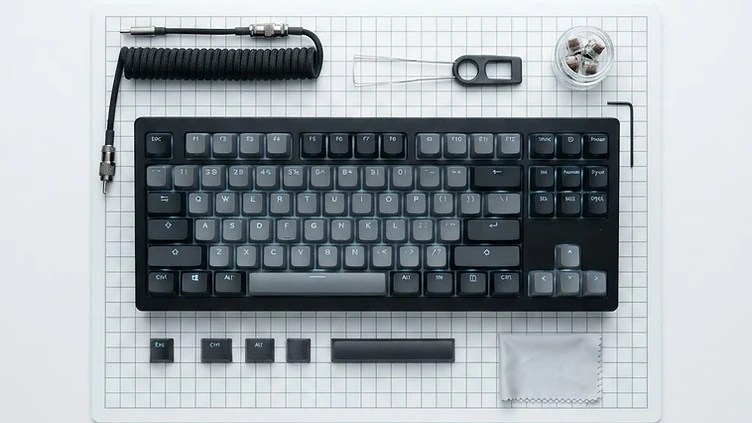
A mechanical keyboard uses a separate switch under each key rather than a rubber-dome membrane. That gives distinct, consistent key feel, durability (often rated for tens of millions of presses), and a choice of switch types — which is why mechanical keyboards are popular with gamers who want fast, reliable actuation and a feel they can tune. There's no single best mechanical gaming keyboard — the right one depends on layout, switch feel, budget, and whether you want wired or wireless. This guide compares eight mechanical keyboards sold in Canada, from a ~$80 TKL to a ~$260 wireless low-profile model, with approximate prices in CAD, and keeps it practical so you can decide quickly. For budget picks, see our Best Gaming Keyboards Under $100 in Canada guide.
A note on accuracy. Prices below are approximate and current as of October 2026, taken from Canadian retailer listings, and can change — always verify the live listing before buying. We haven't personally tested these keyboards; our picks are based on verified specifications, not hands-on reviews.
Quick Picks
- Best compact 60% — Razer Huntsman Mini (~$95): A 60% board with Razer optical switches and Chroma RGB. For shoppers who want the smallest footprint and fast switches.
- Best compact value — HyperX Alloy Origins 60 (~$89): A 60% aluminum board with linear HyperX Red switches and PBT keycaps. For shoppers who want a compact, well-built board for less.
- Best overall value — Corsair K70 CORE (~$100): A TKL board with ML Red linear switches, media controls, and a volume roller. For shoppers who want the most features for the money.
- Best tournament-style compact — Logitech G Pro (~$120): A durable TKL tournament board with Romer-G tactile switches. For competitive players who want a compact, reliable TKL.
- Best affordable TKL — Logitech G413 TKL SE (~$80): A TKL board with Romer-G tactile switches and an aluminum top case. For shoppers who want an affordable tactile TKL.
- Best feature-rich full-size — Razer BlackWidow V4 X (~$137): A full-size board with Green/Yellow switches, a wrist rest, and media controls. For shoppers who want a number pad and lots of keys.
- Best premium TKL — Corsair K70 RGB TKL Champion Series (~$179): A premium TKL with Cherry MX Red/Silver switches and a tournament-grade build. For shoppers who want a premium wired TKL.
- Best low-profile wireless — Logitech G915 LIGHTSPEED (~$259): A low-profile wireless TKL with GL switches, 2.4GHz + Bluetooth, and long battery life. For shoppers who want a premium cable-free board.
The right keyboard depends on layout, switch feel, budget, and gaming preferences — there's no single best for everyone.
Quick Comparison Table
All eight are mechanical keyboards. Some boards offer multiple switch variants; the most common is listed. Prices are current as of October 2026 and subject to change.
| Keyboard | Approx. CAD price | Layout | Switch type | Connection | Best for |
|---|---|---|---|---|---|
| Logitech G413 TKL SE | ~$79.99 | TKL | Tactile (Romer-G) | Wired (USB) | Best affordable TKL option |
| HyperX Alloy Origins 60 | ~$88.98 | 60% | Linear (HyperX Red) | Wired (USB-C) | Best compact value |
| Razer Huntsman Mini | ~$94.99 | 60% | Optical (clicky/linear) | Wired (USB-C) | Best compact 60% option |
| Corsair K70 CORE | ~$99.99 | TKL | Linear (ML Red) | Wired (USB-C) | Best overall value |
| Logitech G Pro Mechanical | ~$119.99 | TKL | Tactile (Romer-G) | Wired (USB) | Best tournament-style compact keyboard |
| Razer BlackWidow V4 X | ~$136.99 | Full-size | Green clicky / Yellow linear | Wired (USB) | Best feature-rich full-size option |
| Corsair K70 RGB TKL Champion | ~$179 | TKL | Cherry MX Red/Silver | Wired (USB-C) | Best premium TKL option |
| Logitech G915 LIGHTSPEED | ~$259 | TKL | Low-profile GL (tactile/linear) | Wireless (2.4GHz + Bluetooth) | Best low-profile wireless option |
Affiliate links aren't active yet. We'll add them once our program is approved. For now, search the product name at your preferred Canadian retailer to check the current price and availability.
Pros and Cons at a Glance
Prices are approximate, in CAD, and can change. The points below are based on documented specifications and listed features, not hands-on testing.
Logitech G413 TKL SE (~$80) — Best Affordable TKL Option
- Pros: TKL layout frees up mouse space; tactile switches with a crisp actuation point; aluminum top plate; media controls on the function row.
- Cons: wired only; single-colour backlighting rather than per-key RGB; no choice of switch type.
HyperX Alloy Origins 60 (~$89) — Best Compact Value
- Pros: 60% aluminum body; linear HyperX Red switches; PBT keycaps; detachable USB-C cable.
- Cons: 60% omits the arrow keys and function row; wired only; the compact layout has a learning curve.
Razer Huntsman Mini (~$95) — Best Compact 60% Option
- Pros: optical switches with fast actuation; 60% footprint leaves maximum mouse room; doubleshot PBT keycaps; detachable USB-C.
- Cons: 60% omits arrow keys and the function row; wired only; the clicky optical variant is loud.
Corsair K70 CORE (~$100) — Best Overall Value
- Pros: TKL aluminum frame; linear ML Red switches; rotary volume dial; per-key RGB; detachable USB-C.
- Cons: wired only; linear switches only in this model; no wrist rest included.
Logitech G Pro Mechanical (~$120) — Best Tournament-Style Compact
- Pros: TKL layout built for esports; tactile Romer-G switches; 12 programmable function keys; detachable cable.
- Cons: wired only; tactile switches only; the price is high for a board with no wrist rest or extra features.
Razer BlackWidow V4 X (~$137) — Best Feature-Rich Full-Size
- Pros: full-size layout with number pad and dedicated media controls; choice of Green clicky or Yellow linear switches; Chroma RGB; wrist rest included.
- Cons: full-size footprint takes desk space; wired only; the clicky switch option is loud.
Corsair K70 RGB TKL Champion Series (~$179) — Best Premium TKL
- Pros: TKL aluminum frame; Cherry MX Red or Speed switches; per-key RGB; tournament switch; detachable USB-C.
- Cons: the most expensive wired board here; no number pad by design; wireless options cost less than this.
Logitech G915 LIGHTSPEED (~$259) — Best Low-Profile Wireless
- Pros: LIGHTSPEED 2.4GHz plus Bluetooth wireless; low-profile GL switches; aluminum deck; per-key RGB; long manufacturer-stated battery life.
- Cons: by far the most expensive option here; the short-travel low-profile switches aren't for everyone; wireless means managing a battery.
Check current price. No retailer links appear here yet — no affiliate program is active. Once one is approved, each pick above will carry a "View current price" link to a Canadian retailer. For now, search the exact model name and switch variant to see today's price.
The Keyboards
Logitech G413 TKL SE (~$80)
An affordable TKL mechanical keyboard with Romer-G tactile switches, a durable aluminum top case, and white backlighting (not full RGB). USB wired. Best for: shoppers who want an affordable TKL mechanical keyboard. Drawbacks: white backlight only (no RGB), and non-hot-swappable switches. Who should consider it: players who want a no-nonsense tactile TKL board for the least money.
HyperX Alloy Origins 60 (~$89)
A 60% mechanical keyboard with linear HyperX Red switches, a solid aluminum body, and double-shot PBT keycaps with side-printed secondary functions. Detachable USB-C cable. Best for: shoppers who want compact value. Drawbacks: no arrow keys or function row (accessed via layers), and no wrist rest. Who should consider it: low-sensitivity FPS players who want a compact, well-built aluminum board.
Razer Huntsman Mini (~$95)
A 60% mechanical keyboard with Razer optical switches (clicky or linear), Razer Chroma RGB, and five onboard memory profiles. Wired over a 2m USB-C cable. Best for: shoppers who want the most compact 60% option. Drawbacks: no arrow keys or function row, and clicky switches are loud. Who should consider it: players who want the smallest footprint and fast optical switches.
Corsair K70 CORE (~$100)
A TKL mechanical keyboard with CORSAIR ML Red linear switches, a brushed aluminum frame, per-key RGB, dedicated media controls, and a volume roller. USB-C wired. Best for: shoppers who want the best overall value. Drawbacks: no wrist rest included, and no hot-swap. Who should consider it: players who want a feature-rich TKL with media controls and a solid build around $100.
Logitech G Pro Mechanical Gaming Keyboard (~$120)
A TKL tournament-style mechanical keyboard with Romer-G tactile switches, a compact and durable design, and Logitech G HUB software for customization. USB wired. Best for: shoppers who want a tournament-style compact keyboard. Drawbacks: tactile switches aren't for everyone, and no dedicated media controls. Who should consider it: competitive and tournament players who want a compact, durable TKL board.
Razer BlackWidow V4 X (~$137)
A full-size mechanical keyboard with Razer Green (clicky) or Yellow (linear) switches, Razer Chroma RGB, a magnetic wrist rest, and dedicated media controls. USB wired. Best for: shoppers who want a feature-rich full-size option. Drawbacks: full-size takes desk space, and clicky switches are loud. Who should consider it: MMO and productivity users who want a number pad, lots of keys, and a wrist rest.
Corsair K70 RGB TKL Champion Series (~$179)
A premium TKL mechanical keyboard with Cherry MX Red or Silver switches, per-key RGB, an aluminum frame, dedicated media controls, and a tournament-grade build. USB-C wired with onboard profile storage. Best for: shoppers who want a premium TKL option. Drawbacks: it's pricey for a wired TKL, and no wrist rest. Who should consider it: competitive players who want a premium, durable TKL with Cherry MX switches.
Logitech G915 LIGHTSPEED (~$259)
A low-profile wireless TKL mechanical keyboard with GL switches (tactile, linear, or clicky), 2.4GHz LIGHTSPEED and Bluetooth, per-key RGB, and a rechargeable battery with long life. Best for: shoppers who want a low-profile wireless option. Drawbacks: it's the most expensive here, and low-profile switches aren't for everyone. Who should consider it: players who want a premium low-profile wireless board and a cable-free desk.
Mechanical Switch Types Explained
- Linear switches: a smooth, consistent press with no bump or click. Quiet and fast, which makes them popular for gaming where quick, repeated presses matter.
- Tactile switches: a noticeable bump partway down tells you the key has actuated. A balance of feedback and quiet — good for typing and gaming.
- Clicky switches: a tactile bump plus an audible click. Satisfying and clear, but loud — not ideal for shared rooms or late-night sessions.
No switch type is universally better. It comes down to feel, noise, and whether you game, type, or both.
What Keyboard Size Should You Choose?
- Full-size (100%): number pad, function row, and arrow keys. Most keys, least desk space — best if you use the number pad.
- TKL (80%): drops the number pad but keeps the function row and arrows. Frees up mouse space while keeping most keys.
- 75%: like TKL but packs the function row into the main block. Compact without losing function keys.
- 65%: drops the function row but keeps arrow keys. A balance of compact size and usability.
- 60%: drops the function row and arrow keys (accessed via layers). Smallest here — maximum mouse space, but a learning curve.
As keyboards get smaller, the number pad, function row, and arrow keys are the first to go. Gamers with limited desk space — especially low-sensitivity FPS players who need mouse room — often prefer compact layouts.
Wired vs Wireless
Wired keyboards have no battery to charge, no latency concerns, and no wireless protocol to worry about — plug in and play. They remain popular with competitive players for their simplicity and reliability. Wireless keyboards reduce cable clutter and give a cleaner desk. Modern 2.4GHz wireless is low-latency enough for most players, but you trade battery management and a higher price for cable-free freedom. Wireless isn't automatically better or worse — it's about whether you value a clean desk over the simplicity of a cable.
Key Features to Look For
- RGB lighting: helps you see keys in the dark and matches your setup. It doesn't improve performance — treat it as preference.
- N-key rollover: ensures every key press registers when you press several at once. Standard on most mechanical gaming keyboards.
- Anti-ghosting: prevents unintended key presses when many keys are held. Standard for gaming.
- Polling rate: how often the keyboard reports to the PC; 1000 Hz is standard for gaming. Higher rates rarely matter to most players.
- Hot-swappable switches: let you change switches without soldering, so you can tune feel over time. A nice-to-have if you're unsure which switch you'll prefer.
- Programmable keys: let you remap keys and set macros. Useful for MMO and productivity, less so for casual play.
- Dedicated media controls: a volume wheel or media keys are genuinely useful during play.
- Wrist rests: improve comfort over long sessions. Some keyboards include one; others don't.
- PBT vs ABS keycaps: PBT keycaps resist shine and wear better than ABS. PBT is a sign of better long-term build quality.
How Much Should You Spend on a Mechanical Gaming Keyboard?
- Under $100: solid compact and TKL mechanical keyboards with linear or clicky switches, aluminum or sturdy plastic builds, and RGB. Most gamers' needs are met here. See our Best Gaming Keyboards Under $100 in Canada guide for more.
- $100–$150: better-built TKL and full-size boards with more features (media controls, wrist rests, software) and durable frames.
- $150–$250: premium TKL and full-size boards with Cherry MX or proprietary switches, strong aluminum builds, and tournament-grade features.
- $250+: premium wireless and low-profile boards with rechargeable batteries, multi-device wireless, and high-end build — the G915 LIGHTSPEED is the example here. Spending more doesn't automatically mean a better keyboard for you.
How to Choose a Mechanical Gaming Keyboard
- Pick the layout. TKL suits most gamers who want mouse space without losing too much; 60% and 65% are more compact but move keys to layers; full-size keeps the number pad.
- Choose the switch type. Linear is the common fast, quiet gaming choice; tactile adds a bump for feedback; clicky feels crisp but is loud. There's no universally best switch.
- Check keycaps and build. PBT keycaps resist shine better than ABS, and an aluminum or steel plate feels sturdier than plastic.
- Decide wired or wireless. Wired gives the best value and no charging; 2.4GHz wireless is low-latency but costs considerably more.
- Consider hot-swappable switches. If you want to change switch feel later, a hot-swap board saves buying a second keyboard.
- Note the features you'll use. A wrist rest, media controls, and a volume dial matter day to day; RGB zone counts matter less.
For budget mechanical and membrane options under $100, see our Best Gaming Keyboards Under $100 in Canada guide.
Before You Buy
- Prices in this guide are approximate, in CAD, and can change — verify the live listing.
- Availability changes, and many boards ship in several switch and layout variants under one name.
- Confirm the switch type, layout, and keycap material on the manufacturer or retailer page.
- Check whether the model is wired, 2.4GHz wireless, or Bluetooth before ordering.
- If switch feel matters to you, confirm the exact variant you're buying rather than the family name.
FAQ
What is the best mechanical gaming keyboard in Canada?
There's no single best — it depends on layout, switch feel, and budget. For overall value, the Corsair K70 CORE; for compact value, the HyperX Alloy Origins 60; for premium TKL, the Corsair K70 RGB TKL Champion Series; for low-profile wireless, the Logitech G915 LIGHTSPEED.
Are mechanical keyboards better for gaming?
Not automatically — but they offer distinct, consistent key feel, durability, and switch choice that many gamers prefer. A good membrane keyboard is fine for casual play; mechanical shines if you value feel and longevity.
What mechanical switch is best for gaming?
It depends. Linear is the popular gaming choice for fast, quiet presses; tactile adds feedback; clicky is satisfying but loud. No switch is universally best — try them if you can.
Are 60% keyboards good for gaming?
Yes, especially for low-sensitivity FPS players who want maximum mouse space. You lose arrow keys and a function row (accessed via layers), so there's a learning curve.
Is a TKL keyboard better than a full-size keyboard?
Neither is better — TKL frees up mouse space by dropping the number pad; full-size keeps the number pad for productivity. Pick by whether you use the number pad.
Are wireless mechanical keyboards good for gaming?
Yes, modern 2.4GHz wireless is low-latency enough for most players. You trade battery management and a higher price for a cable-free desk.
What is a good mechanical gaming keyboard under $100?
The Corsair K70 CORE (~$100) and HyperX Alloy Origins 60 (~$89) are strong picks. See our under-$100 keyboard guide for more budget options.
The Bottom Line
The right mechanical gaming keyboard depends on layout, switch feel, budget, and wired-or-wireless preference. For compact value, the HyperX Alloy Origins 60; for the smallest 60% option, the Razer Huntsman Mini; for overall value, the Corsair K70 CORE; for an affordable TKL, the Logitech G413 TKL SE; for a tournament-style TKL, the Logitech G Pro; for a feature-rich full-size, the Razer BlackWidow V4 X; for a premium TKL, the Corsair K70 RGB TKL Champion Series; and for a low-profile wireless board, the Logitech G915 LIGHTSPEED. Pick by layout and switch feel first — a keyboard that fits your desk and hands will always beat a pricier one that doesn't.
Related Borealis guides
- Gaming Keyboards — our full category guide.
- Best Gaming Keyboards Under $100 in Canada — our guide to keyboards under $100.
- Best Gaming Headsets Under $100 in Canada — pair your keyboard with a good headset.
- Best Gaming Mice Under $50 in Canada — match your keyboard with the right mouse.
- Best Gaming Monitors Under $300 in Canada — complete your setup with the right monitor.
- All Borealis articles — the full library, including upcoming guides.
More in Gaming Keyboards
Category Guide →Best Gaming Keyboards Under $100 in Canada
An independent Canadian buying guide to gaming keyboards under $100 — quick picks, a comparison table, what actually matters (mechanical vs membrane, switches, size, features), and how to choose.
Read →60% vs 75% vs TKL Gaming Keyboards: What's the Difference?
A forthcoming guide to compact keyboard layouts — what you gain, what you lose, and which size fits your desk and games.