Best Gaming Mice Under $50 in Canada
An independent Canadian buying guide to gaming mice under $50 — quick picks, a simple comparison table, what actually matters (shape, grip, weight, sensor, buttons, wired vs wireless), and how to choose.
Affiliate disclosure: Borealis is reader-supported. We may earn a commission from qualifying purchases made through certain links — at no extra cost to you. We do not currently use Best Buy affiliate links, and we are not affiliated with Best Buy or any retailer. Read the full disclosure.
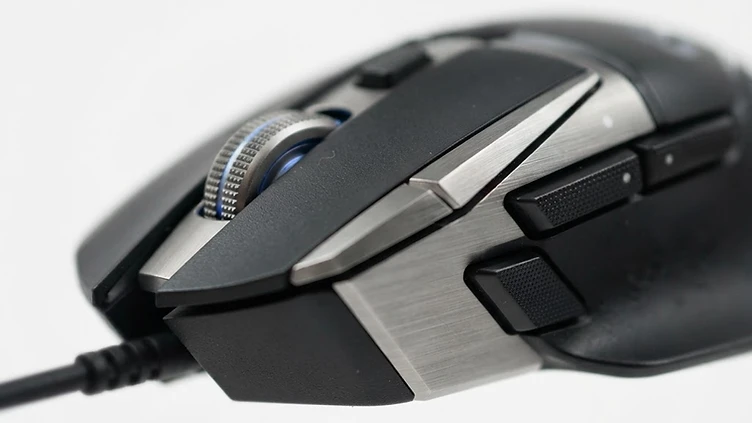
A good gaming mouse doesn't have to be expensive. Under $50 CAD, you can get a capable sensor, a comfortable shape, and the buttons you need for most games — without paying for premium materials or features you won't use. What actually matters is how the mouse fits your hand, how it tracks, and whether it suits the way you play. This guide keeps it short so you can decide quickly.
A note on accuracy. Prices below are approximate and current as of October 2026, taken from Best Buy Canada listings, and can change — always verify the live listing before buying. Some prices are current sale prices. We haven't personally tested these mice; our picks are based on verified specifications, not hands-on reviews.
Quick Picks
- Best budget — Razer DeathAdder Essential (~$33): A classic right-handed ergonomic wired shape with a 6,400 DPI sensor and 5 buttons. For shoppers who want a simple, comfortable wired mouse for the least money.
- Best overall value — Logitech G203 LIGHTSYNC (~$40): A light 90 g wired mouse with 6 programmable buttons, 8,000 DPI, RGB lighting, and Logitech G HUB software. For shoppers wanting a capable, customizable wired mouse.
- Best ergonomic option — Razer Basilisk V3 (~$48): A right-handed ergonomic mouse with a thumb rest, 10+1 programmable buttons, a dual-mode scroll wheel, and a 26,000 DPI sensor. For shoppers who want an ergonomic wired mouse with lots of buttons.
- Best wireless option — Razer DeathAdder V2 X HyperSpeed (~$50, sale): Wireless via 2.4GHz HyperSpeed or Bluetooth, with a 14,000 DPI sensor, 7 buttons, and up to 235 hours of battery. For shoppers who want wireless without going over $50. (Shown at a current sale price; the regular price is higher.)
Quick Comparison Table
All four are at or under $50 CAD. The Basilisk V3 and DeathAdder V2 X HyperSpeed are shown at current sale prices — regular prices are higher. Prices are current as of October 2026 and subject to change.
| Product | Approx. CAD price | Connection | Best for |
|---|---|---|---|
| Razer DeathAdder Essential | $32.98 | Wired (USB) | Budget ergonomic wired pick |
| Logitech G203 LIGHTSYNC | $39.99 | Wired (USB) | Light, low-cost all-rounder |
| Razer Basilisk V3 | $47.99 | Wired (USB) | Ergonomic with thumb rest & many buttons |
| Razer DeathAdder V2 X HyperSpeed | $49.99 | Wireless (HyperSpeed + Bluetooth) | Wireless under $50 |
Affiliate links aren't active yet. We'll add them once our program is approved. For now, search the product name at Best Buy Canada to check the current price and availability.
Pros and Cons at a Glance
Prices are approximate, in CAD, and can change. The points below are based on documented specifications and listed features, not hands-on testing.
Razer DeathAdder Essential (~$33) — Best Budget Pick
- Pros: the lowest price here; classic right-handed ergonomic shape; 5 buttons and a 6,400 DPI sensor; wired USB with nothing to charge.
- Cons: entry-level sensor specification next to the other picks; wired only; the shape is designed for right-handed use.
Logitech G203 LIGHTSYNC (~$40) — Best Value Wired Pick
- Pros: about 90 g and easy to move; 6 programmable buttons; 8,000 DPI sensor; RGB plus Logitech G HUB software.
- Cons: compact symmetrical shape suits smaller hands and claw or fingertip grips; wired only; no adjustable weight.
Razer Basilisk V3 (~$48) — Best for Extra Buttons
- Pros: thumb rest and 10+1 programmable buttons; dual-mode scroll wheel; 26,000 DPI sensor; per-key RGB.
- Cons: larger and heavier than the other picks here, which some players notice in fast, low-sensitivity aiming; right-handed shape only; wired only.
Razer DeathAdder V2 X HyperSpeed (~$50, sale) — Best Budget Wireless Pick
- Pros: wireless over 2.4GHz HyperSpeed with Bluetooth as a backup; runs on a single AA battery, so there's nothing to charge; ergonomic right-handed shape.
- Cons: around 100 g — heavier than the light wired picks; the AA battery adds weight and needs replacing; sale pricing can change.
Check availability. No retailer link appears here yet, because no affiliate program is active. Once one is approved, this is where a "Check availability" link to a Canadian retailer will go. For now, search the exact model name to confirm today's price and stock.
Products to Consider
Razer DeathAdder Essential (~$33)
A no-frills wired mouse with Razer's classic right-handed ergonomic shape — a safe, comfortable pick if you want something simple that just works. It has a 6,400 DPI optical sensor, 5 buttons, and plug-and-play over USB. The cheapest of the group, and a common starting point for new PC gamers.
Logitech G203 LIGHTSYNC (~$40)
A small, light (90 g) wired mouse with 6 programmable buttons, 8,000 DPI, and RGB lighting you can customize in Logitech G HUB. Its shape suits claw and fingertip grips well. A strong all-rounder for the price if you want software customization and low weight.
Razer Basilisk V3 (~$48)
A right-handed ergonomic mouse with a thumb rest, 10+1 programmable buttons, and a dual-mode scroll wheel that switches between notched and free-spin. 26,000 DPI sensor. The most feature-rich pick here — ideal if you play MMOs or games with lots of keybinds, or just want an ergonomic shape.
Razer DeathAdder V2 X HyperSpeed (~$50, sale)
The only wireless pick under $50 here. It connects via 2.4GHz HyperSpeed (low-latency) or Bluetooth, with a 14,000 DPI sensor, 7 buttons, and up to 235 hours of battery. Good if you want to ditch the cable — just note the $49.99 price is a current sale (regular $79.99).
What Actually Matters When Choosing
Shape and hand size
Shape is the most important factor — a mouse that doesn't fit your hand causes fatigue and misclicks. Match the mouse size to your hand size, and decide if you want a symmetric or right-handed ergonomic shape.
Palm, claw, and fingertip grip
- Palm grip: whole hand rests on the mouse — prefer a larger, contoured mouse (e.g., Basilisk V3, DeathAdder Essential).
- Claw grip: arched hand, fingertips and palm heel touching — a medium mouse works well (e.g., G203).
- Fingertip grip: only fingertips touch — prefer a lighter, smaller mouse (e.g., G203).
Weight
Lighter mice (under ~100 g) are easier to move quickly; heavier mice feel more stable. There's no "best" weight — it's preference. The G203 (90 g) is the lightest here.
Sensor and tracking
A modern optical sensor tracks accurately on most surfaces. All four mice here have gaming-grade optical sensors. You don't need the highest DPI — see below.
DPI
DPI (dots per inch) sets cursor speed, not quality. Higher DPI isn't better — most players use 400–1600 DPI. Any mouse here has more than enough DPI; don't choose based on the biggest number.
Number of buttons
Most games need left, right, and a clickable scroll wheel. Extra buttons help in MMOs, MOBAs, and productivity. The Basilisk V3 (10+1) and DeathAdder V2 X (7) have the most; the G203 has 6; the DeathAdder Essential has 5.
Wired vs wireless
Wired is simpler, cheaper, and never needs charging. Wireless gives freedom from the cable. At $50, wired usually gives more for the money; the DeathAdder V2 X HyperSpeed is the one wireless pick here that fits the budget (on sale). If you'd rather skip the cable entirely, our Best Wireless Gaming Mice in Canada guide covers wireless mice at every price.
Which Mouse Should You Choose?
- Tightest budget: DeathAdder Essential — simple, comfortable, cheap.
- Want low weight & customization: G203 LIGHTSYNC.
- Want an ergonomic shape & lots of buttons: Basilisk V3.
- Want wireless: DeathAdder V2 X HyperSpeed (on sale).
- Large hands / palm grip: Basilisk V3 or DeathAdder Essential.
- Small hands / fingertip grip: G203 LIGHTSYNC.
- MMO or many keybinds: Basilisk V3 (most buttons).
- Casual / everyday + gaming: any of these will do — pick by feel and price.
Common Mistakes
- Chasing the highest DPI — it doesn't make you more accurate.
- Assuming wireless is always better — wired is cheaper and never needs charging.
- Ignoring hand size and grip — a wrong-shaped mouse is the most common regret.
- Buying on sensor specs alone — shape and comfort matter more for most players.
- Overlooking button count if you play MMOs/MOBAs — too few buttons means reaching for the keyboard.
How to Choose a Mouse Under $50
- Shape and grip first. Everything else is secondary. Match the mouse to your hand size and whether you palm, claw, or fingertip grip — a well-fitting cheap mouse beats an ill-fitting expensive one.
- Then decide wired or wireless. Wired gives you the most performance per dollar and never needs charging. Wireless gives you a clean desk; at this price it usually means an AA battery and more weight.
- Weigh the mouse. Lighter mice (around 60–90 g) suit fast, low-sensitivity aiming. Heavier mice can feel steadier but are harder to flick.
- Count the buttons you actually use. Extra buttons help MMOs and MOBAs; shooters usually need two side buttons at most.
- Ignore the DPI race. Most players use 400–1600 DPI. A 6,400 DPI sensor is plenty; a higher number isn't better.
- Check software support. If you want to remap buttons or set profiles, confirm the mouse has companion software.
If your budget stretches further, our Best Gaming Mice Under $100 in Canada and Best Wireless Gaming Mice in Canada guides cover the next steps up.
Before You Buy
- Prices here are approximate, in CAD, and some are sale prices that can change quickly.
- Availability changes: models get revised or replaced, and listings can sell out.
- Confirm shape, weight, sensor, and button count on the manufacturer or retailer page.
- Check whether the version you're buying is wired or wireless — the same mouse name is often sold in both.
- Confirm software support if you plan to remap buttons or change DPI in software.
FAQ
Is a $50 gaming mouse good enough?
Yes, for the vast majority of players. Under $50 you get a capable sensor, a usable shape, and enough buttons for most games.
Is higher DPI automatically better?
No. DPI is just speed. Most players use 400–1600 DPI; anything higher is rarely useful.
Is wired better than wireless for gaming?
Wired is simpler and never needs charging; modern 2.4GHz wireless is low-latency too. At $50, wired usually gives more value.
What grip should I use?
Whichever feels natural. Palm for stability, claw for a balance of speed and control, fingertip for quick, small movements. Your grip may also depend on your hand size.
The Bottom Line
Pick by shape and grip first, then by features and price. For under $50 CAD, the DeathAdder Essential is the safe budget choice, the G203 LIGHTSYNC is the best all-round value, the Basilisk V3 is the ergonomic feature-rich pick, and the DeathAdder V2 X HyperSpeed is the wireless option — on sale. Try to hold a mouse before you buy when you can; feel matters more than specs.
Related Borealis guides
- Gaming Mice — our full category guide.
- Best Wireless Gaming Mice in Canada — our guide to wireless mice at every price.
- Best Gaming Mice Under $100 in Canada — our wider guide if your budget stretches to $100.
- Best Gaming Headsets Under $100 in Canada — pair your mouse with a good headset.
- Best Gaming Keyboards Under $100 in Canada — match your mouse with a solid keyboard.
- Best Gaming Monitors Under $300 in Canada — complete your setup with the right monitor.
- All Borealis articles — the full library, including upcoming guides.
More in Gaming Mice
Category Guide →Best Gaming Mice Under $100 in Canada
An independent Canadian buying guide to gaming mice under $100 — quick picks, a comparison table, what actually matters (wired vs wireless, DPI, weight, shape, buttons, sensor), and how to choose.
Read →Best Wireless Gaming Mice in Canada
An independent Canadian buying guide to wireless gaming mice — quick picks, a comparison table, 2.4GHz vs Bluetooth, wireless vs wired, weight, grip, battery life, DPI, polling rate, how much to spend, mistakes to avoid, and an FAQ.
Read →What DPI Should You Use for a Gaming Mouse?
A planned explainer on mouse DPI — what it means, how it relates to sensitivity, and how to find a setting that fits your playstyle.