Best Gaming Mice Under $100 in Canada
An independent Canadian buying guide to gaming mice under $100 — quick picks, a comparison table, what actually matters (wired vs wireless, DPI, weight, shape, buttons, sensor), and how to choose.
Affiliate disclosure: Borealis is reader-supported. We may earn a commission from qualifying purchases made through certain links — at no extra cost to you. We do not currently use Best Buy affiliate links, and we are not affiliated with Best Buy or any retailer. Read the full disclosure.
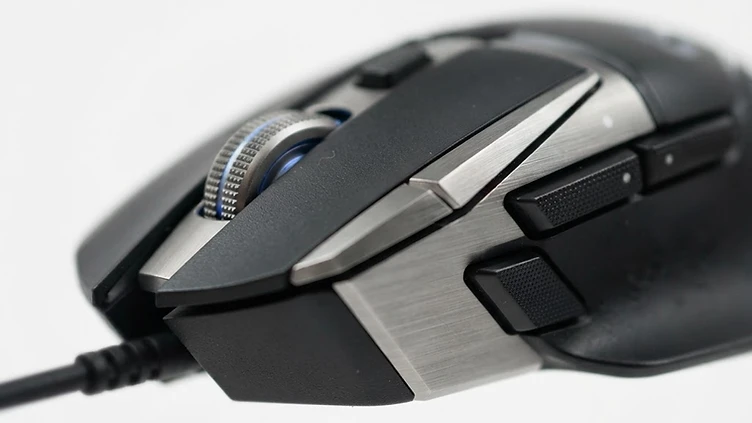
A good gaming mouse doesn't have to cost $100+. Under $100 CAD, you can get a proven sensor, a comfortable shape, wireless freedom, and the buttons you need for almost any game — without paying flagship prices. The right choice depends on shape, weight, connection, button count, and the games you play. This guide keeps it practical so you can decide quickly. If your budget is tighter, our Best Gaming Mice Under $50 in Canada guide covers solid picks for less.
A note on accuracy. Prices below are approximate and current as of October 2026, taken from Canadian retailer listings, and can change — always verify the live listing before buying. We haven't personally tested these mice; our picks are based on verified specifications, not hands-on reviews.
Quick Picks
- Best overall value — Logitech G502 HERO (~$75): A feature-rich wired mouse with 11 buttons, adjustable weights, and a dual-mode scroll wheel. For shoppers who want the most features for the money.
- Best budget wireless — Logitech G305 LIGHTSPEED (~$70): A reliable 2.4GHz wireless mouse with a HERO sensor and long battery life on a single AA. For shoppers who want dependable wireless without paying premium prices.
- Best wired feature-rich — Razer Basilisk V3 (~$100): An ergonomic wired mouse with a thumb rest, 10+1 buttons, and a free-spin scroll wheel. For shoppers who want the most feature-rich wired mouse under $100.
- Best lightweight ergonomic wireless — Razer DeathAdder V3 HyperSpeed (~$95–100): A light (~64 g) ergonomic wireless mouse with a 30K sensor. For shoppers who want a light, ergonomic wireless mouse for fast play.
- Best for fast-paced FPS — Razer Viper V3 HyperSpeed (~$100): A light (~68 g) symmetrical wireless mouse built for speed. For FPS players who want a light, ambidextrous wireless mouse.
- Best ergonomic wireless — Razer Basilisk V3 X HyperSpeed (~$100): An ergonomic wireless mouse with a thumb rest, HyperSpeed + Bluetooth, and 10+1 buttons. For shoppers who want an ergonomic wireless mouse with lots of buttons.
- Best cheap wired — Logitech G203 LIGHTSYNC (~$40): A light wired mouse with 6 buttons, 8,000 DPI, and RGB. For shoppers who want the cheapest capable wired mouse.
- Best compact wireless — Razer Orochi V2 (~$48): A small, light wireless mouse with HyperSpeed + Bluetooth and long battery life. For laptop gamers and small-handed players who want a portable wireless mouse.
Quick Comparison Table
All eight are at or under $100 CAD. Weights are approximate (without cable) and battery-powered mice vary with the battery used. Prices are current as of October 2026 and subject to change.
| Mouse | Approx. CAD price | Connection | Approx. weight | Best for | Key feature |
|---|---|---|---|---|---|
| Logitech G203 LIGHTSYNC | ~$39.99 | Wired (USB) | ~90 g | Best cheap wired mouse | Low-cost + RGB |
| Razer Orochi V2 | ~$47.99 | Wireless (HyperSpeed + Bluetooth) | ~60 g | Best compact wireless | Portable + long battery |
| Logitech G305 LIGHTSPEED | ~$69.99 | Wireless (2.4GHz LIGHTSPEED) | ~99 g | Best budget wireless | Reliable wireless + AA battery |
| Logitech G502 HERO | ~$74.99 | Wired (USB) | ~121 g | Best overall value (feature-rich wired) | 11 buttons + adjustable weights |
| Razer DeathAdder V3 HyperSpeed | ~$95–100 | Wireless (HyperSpeed) | ~64 g | Best lightweight ergonomic wireless | Light ergonomic wireless |
| Razer Basilisk V3 | ~$99.99 | Wired (USB) | ~108 g | Best wired feature-rich | Thumb rest + free-spin wheel |
| Razer Viper V3 HyperSpeed | ~$99.99 | Wireless (HyperSpeed) | ~68 g | Best for fast-paced FPS | Light symmetrical wireless |
| Razer Basilisk V3 X HyperSpeed | ~$99.99 | Wireless (HyperSpeed + Bluetooth) | ~110 g | Best ergonomic wireless | Ergonomic wireless + many buttons |
Affiliate links aren't active yet. We'll add them once our program is approved. For now, search the product name at your preferred Canadian retailer to check the current price and availability.
Pros and Cons at a Glance
Prices are approximate, in CAD, and can change. The points below are based on documented specifications and listed features, not hands-on testing.
Logitech G203 LIGHTSYNC (~$40) — Best Cheap Wired Mouse
- Pros: about 90 g and easy to move; 6 programmable buttons; 8,000 DPI sensor; RGB and Logitech G HUB software.
- Cons: compact symmetrical shape suits smaller hands; wired only; no adjustable weight.
Razer Orochi V2 (~$48) — Best Compact Wireless Pick
- Pros: about 60 g; HyperSpeed 2.4GHz plus Bluetooth; long battery life on a single AA; small shape suits travel and smaller hands.
- Cons: the compact body can feel small in large hands; AA battery adds weight; nothing to recharge, but batteries need replacing.
Logitech G305 LIGHTSPEED (~$70) — Best Budget Wireless Pick
- Pros: dependable 2.4GHz LIGHTSPEED wireless with a HERO sensor; long life on one AA battery; symmetrical shape works for left- or right-handed use.
- Cons: around 99 g — heavier than the lightest wireless picks here; AA battery rather than rechargeable; no Bluetooth.
Logitech G502 HERO (~$75) — Best Overall Value
- Pros: 11 programmable buttons; adjustable weights; dual-mode scroll wheel; HERO sensor; a long-established, widely supported shape.
- Cons: about 121 g before weights — heavy for fast competitive aiming; wired only; larger footprint on the mousepad.
Razer DeathAdder V3 HyperSpeed (~$95–100) — Best Lightweight Ergonomic Wireless Pick
- Pros: about 64 g with an ergonomic right-handed shape; 26,000 DPI sensor; HyperSpeed wireless; rechargeable.
- Cons: at the top of this guide's budget; right-handed only; fewer buttons than the feature-focused picks here.
Razer Basilisk V3 (~$100) — Best Wired Feature-Rich Pick
- Pros: thumb rest and 10+1 buttons; free-spin scroll wheel; 26,000 DPI sensor; per-key RGB.
- Cons: about 108 g — heavy next to the light picks; wired only; right-handed shape only.
Razer Viper V3 HyperSpeed (~$100) — Best for Fast-Paced FPS
- Pros: about 68 g with a symmetrical shape; 30K Focus Pro sensor; HyperSpeed wireless; long AA battery life.
- Cons: at the top of the budget; AA battery rather than rechargeable; symmetrical shape has no thumb-rest buttons.
Razer Basilisk V3 X HyperSpeed (~$100) — Best Ergonomic Wireless Pick
- Pros: thumb rest with 10+1 buttons; HyperSpeed plus Bluetooth; 18,000 DPI sensor; wireless.
- Cons: about 110 g — the heaviest pick here; right-handed shape only; the price sits at this guide's ceiling.
Check availability. There are no retailer links here yet, because no affiliate program is active. Once one is approved, each pick above will carry a "Check availability" link to a Canadian retailer. For now, search the exact model name to confirm today's price and stock.
The Mice
Logitech G203 LIGHTSYNC (~$40)
A light (~90 g) wired mouse with 6 programmable buttons, an 8,000 DPI sensor, and RGB lighting you can customize in Logitech G HUB. Its compact shape suits claw and fingertip grips. Best for: shoppers who want the cheapest capable wired mouse. Drawbacks: only two side buttons, and the cable can feel a bit stiff. Who should buy it: budget-conscious players who want a reliable wired mouse for casual or competitive play. (Also featured in our under-$50 guide.)
Razer Orochi V2 (~$48)
A compact wireless mouse (~60 g without cable) connecting via 2.4GHz HyperSpeed or Bluetooth, with an 18,000 DPI sensor and long battery life on a single AA or AAA battery. Best for: shoppers who want a small, portable wireless mouse. Drawbacks: the small size won't suit large hands or palm grip. Who should buy it: laptop gamers, travelers, and small-handed players who want wireless in a compact body.
Logitech G305 LIGHTSPEED (~$70)
A dependable wireless mouse (~99 g with the AA battery) using Logitech's 2.4GHz LIGHTSPEED, with the HERO sensor (12,000 DPI) and up to 250 hours of battery on a single AA. Best for: shoppers who want reliable wireless without paying premium prices. Drawbacks: no Bluetooth, and the AA battery adds weight. Who should buy it: shoppers who want a simple, reliable wireless mouse for gaming and everyday use.
Logitech G502 HERO (~$75)
A feature-rich wired mouse with 11 programmable buttons, a dual-mode (notched/free-spin) scroll wheel, adjustable weights, and the HERO 25K sensor (up to 25,600 DPI) via Logitech G HUB. Best for: shoppers who want the most buttons and customization for the money. Drawbacks: at ~121 g it's on the heavy side, and the shape is busy for players who want simplicity. Who should buy it: MMO and MOBA players, and productivity users, who want lots of programmable buttons on a wired mouse.
Razer DeathAdder V3 HyperSpeed (~$95–100)
A lightweight (~64 g) wireless ergonomic mouse with Razer's HyperSpeed 2.4GHz, a 30,000 DPI Focus Pro sensor, and up to 90 hours of battery. Best for: shoppers who want a light, ergonomic wireless mouse for fast play. Drawbacks: fewer buttons (5) and a higher price than the G305. Who should buy it: FPS and competitive players who want a light ergonomic wireless mouse.
Razer Basilisk V3 (~$100)
A right-handed ergonomic wired mouse with a thumb rest, 10+1 programmable buttons, a dual-mode (notched/free-spin) scroll wheel, and a 26,000 DPI sensor. Best for: shoppers who want the most feature-rich wired mouse under $100. Drawbacks: wired only, and the large shape may not suit small hands. Who should buy it: MMO and MOBA players, and productivity users, who want lots of buttons and a comfortable ergonomic shape. (Also featured in our under-$50 guide.)
Razer Viper V3 HyperSpeed (~$100)
A lightweight (~68 g) symmetrical wireless mouse with HyperSpeed 2.4GHz, a 30,000 DPI Focus Pro sensor, and up to 125 hours of battery. Best for: fast-paced FPS players who want a light, ambidextrous wireless mouse. Drawbacks: the symmetrical shape has no thumb rest, and there are fewer buttons (5). Who should buy it: FPS players who prioritize low weight and speed over extra buttons.
Razer Basilisk V3 X HyperSpeed (~$100)
A right-handed ergonomic wireless mouse with a thumb rest, HyperSpeed 2.4GHz and Bluetooth, 10+1 programmable buttons, a dual-mode scroll wheel, and a 26,000 DPI sensor. Best for: shoppers who want an ergonomic wireless mouse with lots of buttons and Bluetooth. Drawbacks: heavier (~110 g) and powered by a battery. Who should buy it: MMO and MOBA players, and productivity users, who want an ergonomic wireless mouse with many programmable buttons.
Wired vs Wireless Gaming Mice
Wired mice have no battery to charge and no wireless protocol to worry about — plug in and play. They're usually cheaper for the same features. Wireless mice free you from the cable and give you a cleaner desk. Modern 2.4GHz wireless (like Logitech LIGHTSPEED and Razer HyperSpeed) is low-latency enough that most players won't notice a difference. Wireless isn't automatically better — you trade battery management and a slightly higher price for cable-free freedom. If you want the most features per dollar, wired still wins; if you value a clean, cable-free setup, wireless is worth it under $100. For a dedicated comparison of wireless models at every price, see our Best Wireless Gaming Mice in Canada guide.
What DPI Actually Means
DPI (dots per inch) sets how far the cursor moves per inch of mouse movement — it's sensitivity, not quality. A higher maximum DPI does not make a mouse better or more accurate. Most players use 400–1600 DPI; very high settings are rarely useful and can feel jittery. Every mouse here has far more DPI than you need. Don't pick a mouse based on the biggest DPI number — pick by shape, weight, and features.
Mouse Weight
Mouse weight is preference, not a spec to maximize or minimize. Lighter mice (roughly under 70 g) are easier to flick quickly, which many FPS players prefer. Heavier mice can feel more stable and controlled, and often carry more buttons and features. There's no "best" weight — some players even add weights (the G502 HERO includes adjustable weights). If you play fast, competitive games, lean light; if you want lots of buttons and a planted feel, a heavier mouse is fine.
Mouse Shape and Grip
Shape matters more than any spec — a mouse that doesn't fit your hand causes fatigue and misclicks. Match the mouse to your hand size and grip:
- Palm grip: your whole hand rests on the mouse — prefer a larger, contoured shape (e.g., G502 HERO, Basilisk V3).
- Claw grip: arched hand, fingertips and palm heel touching — a medium shape works well (e.g., G305, DeathAdder V3).
- Fingertip grip: only fingertips touch — prefer a lighter, smaller mouse (e.g., G203, Orochi V2).
Symmetrical (ambidextrous) shapes suit both left- and right-handers; ergonomic shapes are sculpted for right-handed comfort. Try to hold a mouse before buying when you can.
How Many Buttons Do You Need?
Most games need left, right, and a clickable scroll wheel. FPS players often prefer fewer buttons — a clean, light mouse is easier to handle. MMO and MOBA players benefit from more programmable buttons for keybinds and macros. Productivity users also benefit from extra buttons for shortcuts. Here, the G502 HERO and both Basilisk V3 models offer 10+1 buttons; the G305, G203, DeathAdder V3, Viper V3, and Orochi V2 keep things simpler (5–6 buttons).
Sensor and Polling Rate
A modern optical sensor tracks accurately at high speeds — every mouse here has a gaming-grade sensor. Polling rate (measured in Hz) is how often the mouse reports its position to the PC; 1000 Hz is standard for gaming and reports about every millisecond. Higher polling rates (2000 Hz and up) exist but most players can't tell the difference. Sensor and polling rate are rarely the deciding factor under $100 — focus on shape, weight, and features.
How to Choose a Gaming Mouse Under $100
- By genre: FPS and competitive → light, simple mice (DeathAdder V3 HyperSpeed, Viper V3 HyperSpeed, G203). MMO/MOBA → more buttons (G502 HERO, Basilisk V3, Basilisk V3 X HyperSpeed).
- By hand size: large hands → G502 HERO, Basilisk V3, DeathAdder V3. Small hands → G203, Orochi V2.
- By grip: palm → G502 HERO, Basilisk V3. Claw → G305, DeathAdder V3. Fingertip → G203, Orochi V2.
- Wired vs wireless: want the most features per dollar → wired (G502 HERO, Basilisk V3). want a clean desk → wireless (G305, DeathAdder V3, Viper V3, Basilisk V3 X, Orochi V2).
- By weight: want light → Orochi V2 (~60 g), DeathAdder V3 (~64 g), Viper V3 (~68 g). want a planted feel → G502 HERO (~121 g), Basilisk V3 X (~110 g).
- By buttons: want lots → G502 HERO, Basilisk V3, Basilisk V3 X (10+1). want few → DeathAdder V3, Viper V3, G203 (5–6).
- By budget: under $50 → see our Best Gaming Mice Under $50 in Canada guide. Around $70–100 → G305, G502 HERO, and the Razer wireless options.
Before You Buy
- Prices in this guide are approximate, in CAD, and can change — verify the live listing before buying.
- Availability changes, and several picks here are regularly discounted, so sale prices move around.
- Confirm weight, shape, sensor, and button count on the manufacturer or retailer page.
- Check whether you're buying the wired or wireless version — many of these mice come in both.
- If you use software for remapping or DPI profiles, confirm the model supports it.
FAQ
What is the best gaming mouse under $100 in Canada?
There's no single best mouse — it depends on your grip, hand size, and games. For all-round value and features, the Logitech G502 HERO stands out; for light wireless FPS play, the Razer Viper V3 HyperSpeed or DeathAdder V3 HyperSpeed; for budget wireless, the Logitech G305 LIGHTSPEED.
Is a $50 gaming mouse good enough?
Yes, for most players. Around $40–50 you get a capable sensor, a usable shape, and enough buttons for most games. See our under-$50 guide for specific picks.
Is wireless worth it for gaming?
Yes, if you value a cable-free desk. Modern 2.4GHz wireless is low-latency enough for most players. You trade battery management and a slightly higher price for freedom from the cable.
What DPI should I use for gaming?
Most players use 400–1600 DPI. Higher DPI isn't better — it's just faster. Set a DPI that feels comfortable at your screen resolution and adjust in-game sensitivity separately.
Is a heavier or lighter gaming mouse better?
Neither is universally better. Lighter mice suit fast, low-sensitivity aiming; heavier mice can feel more stable and often carry more buttons. It's personal preference.
What gaming mouse is best for FPS games?
A light mouse with a clean shape and few buttons — here, the Razer Viper V3 HyperSpeed and Razer DeathAdder V3 HyperSpeed. The Logitech G305 LIGHTSPEED is a budget-friendly wireless alternative.
The Bottom Line
The right gaming mouse under $100 depends on your grip, hand size, games, and whether you want wired or wireless. For feature-rich wired value, the Logitech G502 HERO; for budget wireless, the Logitech G305 LIGHTSPEED; for light ergonomic wireless, the Razer DeathAdder V3 HyperSpeed; for fast FPS, the Razer Viper V3 HyperSpeed; for ergonomic wireless with lots of buttons, the Razer Basilisk V3 X HyperSpeed; for a cheap wired mouse, the Logitech G203 LIGHTSYNC; and for a compact wireless travel mouse, the Razer Orochi V2. Pick by shape and feel first — a mouse that fits your hand will always outperform one with better specs that doesn't.
Related Borealis guides
- Gaming Mice — our full category guide.
- Best Wireless Gaming Mice in Canada — our dedicated guide if you'd rather go wireless.
- Best Gaming Mice Under $50 in Canada — our guide to solid picks under $50.
- Best Gaming Headsets Under $100 in Canada — pair your mouse with a good headset.
- Best Gaming Keyboards Under $100 in Canada — match your mouse with a solid keyboard.
- Best Gaming Monitors Under $300 in Canada — complete your setup with the right monitor.
- All Borealis articles — the full library, including upcoming guides.
More in Gaming Mice
Category Guide →Best Gaming Mice Under $50 in Canada
An independent Canadian buying guide to gaming mice under $50 — quick picks, a simple comparison table, what actually matters (shape, grip, weight, sensor, buttons, wired vs wireless), and how to choose.
Read →Best Wireless Gaming Mice in Canada
An independent Canadian buying guide to wireless gaming mice — quick picks, a comparison table, 2.4GHz vs Bluetooth, wireless vs wired, weight, grip, battery life, DPI, polling rate, how much to spend, mistakes to avoid, and an FAQ.
Read →What DPI Should You Use for a Gaming Mouse?
A planned explainer on mouse DPI — what it means, how it relates to sensitivity, and how to find a setting that fits your playstyle.